


All Support Posts for January, 2014
How To create a custom warning message
Hi
Starting with revision 2.14.5136 It is possible to create and manage a completely custom warning system. To initialize this feature you need to manually edit the database table “Warnings” and add a record to this table with the “Code” field set to the number 1001 (which internally is used to identify this warning).
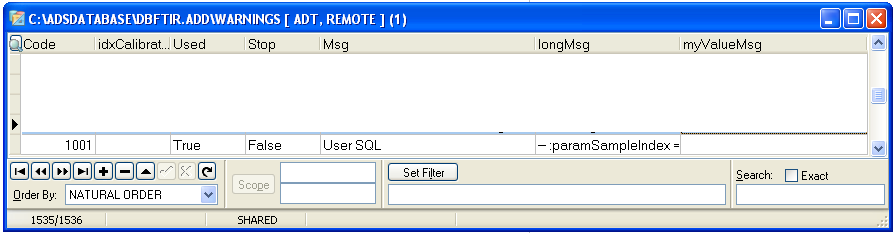
Once this is done, the custom SQL can be created. You can create/edit the SQL and place it in the column “longMSG” .
Once initialized, the options dialog under warnings will include a field showing the SQL – double click this field to edit/view the code.
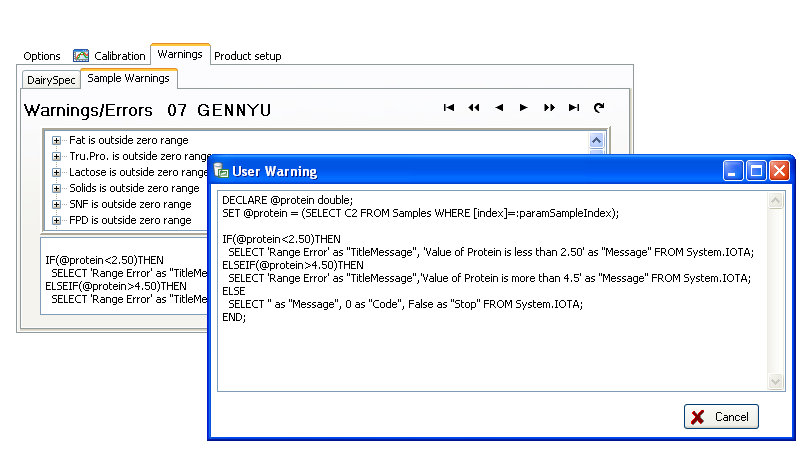
This SQL can take many forms – the following is a simple limit check on a protein reading
DECLARE @protein double; SET @protein = (SELECT C2 FROM Samples WHERE [index]=:paramSampleIndex); IF(@protein<2.50)THEN SELECT 'Range Error' as "TitleMessage", 'Value of Protein is less than 2.50' as "Message" FROM System.IOTA; ELSEIF(@protein>4.50)THEN SELECT 'Range Error' as "TitleMessage",'Value of Protein is more than 4.5' as "Message" FROM System.IOTA; ELSE SELECT '' as "Message", 0 as "Code", False as "Stop" FROM System.IOTA; END; |
In the above SQL there are several special requirements that must be met
- SET @protein = (SELECT C2 FROM Samples WHERE [index]=:paramSampleIndex); — selects the current sample and returns the Protein value to the local variable
The first condition in the error message compares the protein value to a fixed value of 2.50
- IF(@protein<2.50)THEN
The most important is to return a result in the proper format in order to show the warning
- SELECT ‘Range Error‘ as “TitleMessage”, ‘Value of Protein is less than 2.50‘ as “Message” FROM System.IOTA
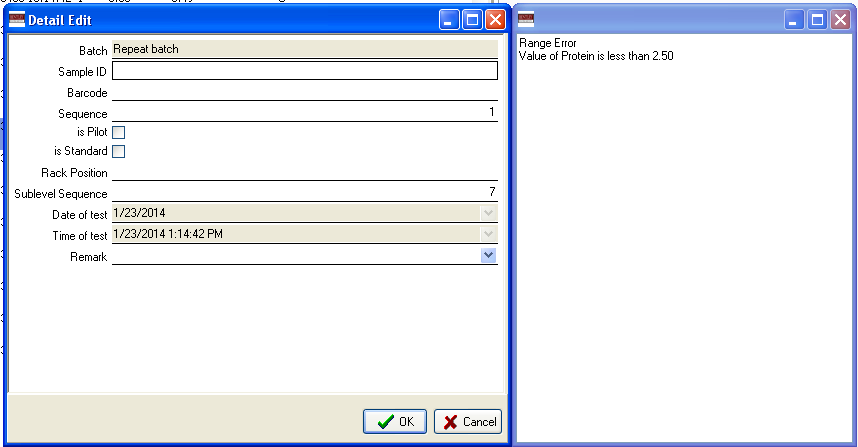
It is important to use the single and double quotes exactly as shown. The “Message” will show as the longer message in the error message and the “TitleMessage” will be displayed as the title of the warning. The samples in the main display will get a question mark on the icon, and when double clicking the sample the error messages will show as
A second example would test the sample identification and only test the result if the sample has a specific id. The example is created as the above and shows the added logic in bold.
DECLARE @protein double;
DECLARE @sampleid varchar(80);
SET @protein = (SELECT C2 FROM Samples WHERE [index]=:paramSampleIndex);
SET @sampleid = (SELECT SampleID FROM Samples WHERE [index]=:paramSampleIndex);
IF (UPPER(@sampleid)=UPPER('HELLO')) THEN
IF(@protein<2.50)THEN
SELECT 'Range Error' as "TitleMessage", 'Protein is less than 2.50' as "Message" FROM System.IOTA;
ELSEIF(@protein>4.50)THEN
SELECT 'Range Error' as "TitleMessage", 'Protein is higher than 4.5' as "Message" FROM System.IOTA;
ELSE
SELECT '' as "Message", 1 as "Code" FROM System.IOTA;
END;
ELSE
SELECT '' as "Message", 0 as "Code" FROM System.IOTA;
END;
|
The next example is from a BactoCount IBCm where the desired effect is to have a warning only apply to a specific batch type or product as in the IBCm. The example is for an SQL which will single out the samples tested under product number 133 (133 is the index in the batchtypes table).
DECLARE @sidx integer; DECLARE @product integer; SET @product = (SELECT BatchTypeIndex FROM Samples JOIN Batch ON Batch.TestOrder=Samples.BatchIndex WHERE [index]=@sidx); IF (@product=133) THEN |
As the custom warning is execute immediately following the calculation of the final result, a possibility exists to do other custom actions as part of this warning system. A customer requested that when a particular warning happened, the lab would like to see this warning in the sample-id field which can be made immediately visible in the IBCm revisions of the main software. The following SQL executes an update on the samples table and when a sample has a given error – in this case the Sonication control voltage error 0x3310 – if a sample has this error set, the sample id will be filled with the custom message. The SQL must end with the proper select statement as this is what the software would expect the warning system to do – in the example we just return an empty message prompting no further action.
UPDATE Samples
     SET [SampleID] = 'Sonicator Error'
     WHERE ([index]=:paramSampleIndex) AND (ErrorCodes LIKE '%0x3310;%');

SELECT '' as "TitleMessage",
                 '' as "Message",
                 0 as "Code",
                 False as "Stop",
                 False as "Used"
FROM System.IOTA;
|
Posted in Uncategorized | No Comments »
Bentley Instruments SARL
840 Rue Curie Z.A Brunehaut Maroeuil 62161 FranceEmail : Pierre Broutin Phone : +33 622560573

France
Posted in Uncategorized | No Comments »
ClearCell Part 1 | Lot 13108-1-005
Posted in Uncategorized | No Comments »
Buffer – 10 L | Lot 4310-036
Posted in Uncategorized | No Comments »
SomaGlo® | Lot 8861-A-036
Posted in Uncategorized | No Comments »
ClearCell Part 2 | Lot 13108-2-005
Posted in Uncategorized | No Comments »
Activator 2 | Lot 4368-025
Posted in Uncategorized | No Comments »
Bacto Kit 500 Component 3 | Lot 10233-A-043
Posted in Uncategorized | No Comments »
Activator 1 | Lot 4367-018
Posted in Uncategorized | No Comments »
Dye Part 2 | Lot 4352-023
Posted in Uncategorized | No Comments »
Enzyme | Lot 3771-2-23
Posted in Uncategorized | No Comments »
Triton X-100 – 10 mL | Lot 12881-005
Posted in Uncategorized | No Comments »
Microspheres 0.5µ | Lot 3724-661259
Posted in Uncategorized | No Comments »
Enzyme | Lot 3771-2-022
Posted in Uncategorized | No Comments »
SCC Kit – Part 2 | Lot 3806-2-029
Posted in Uncategorized | No Comments »
SCC Kit – Part 1 | Lot 3806-1-034
Posted in Uncategorized | No Comments »
Enzyme | Lot 3771-2-021
Posted in Uncategorized | No Comments »
Dye Part 1 | Lot 4353-023
Posted in Uncategorized | No Comments »
Buffer – 50 L | Lot 4350-025
Posted in Uncategorized | No Comments »
Buffer | Lot 4345-019
Posted in Uncategorized | No Comments »
Buffer – 20 L | Lot 4320-030
Posted in Uncategorized | No Comments »
Buffer – 10 L | Lot 4310-035
Posted in Uncategorized | No Comments »
SCC Kit – Part 2 | Lot 3806-2-028
Posted in Uncategorized | No Comments »
SCC Kit – Part 1 | Lot 3806-1-033
Posted in Uncategorized | No Comments »
Staining Buffer Part 2 | Lot 3771-6-019
Posted in Uncategorized | No Comments »
News
Bentley Instruments is waiting for you at the Forum Labo Paris international exhibition dedicated to…
Read More >

